Starlink Marine Installation Guide: Everything Boat Owners Need
By InstallPros Team · July 18, 2026 · 8 min read
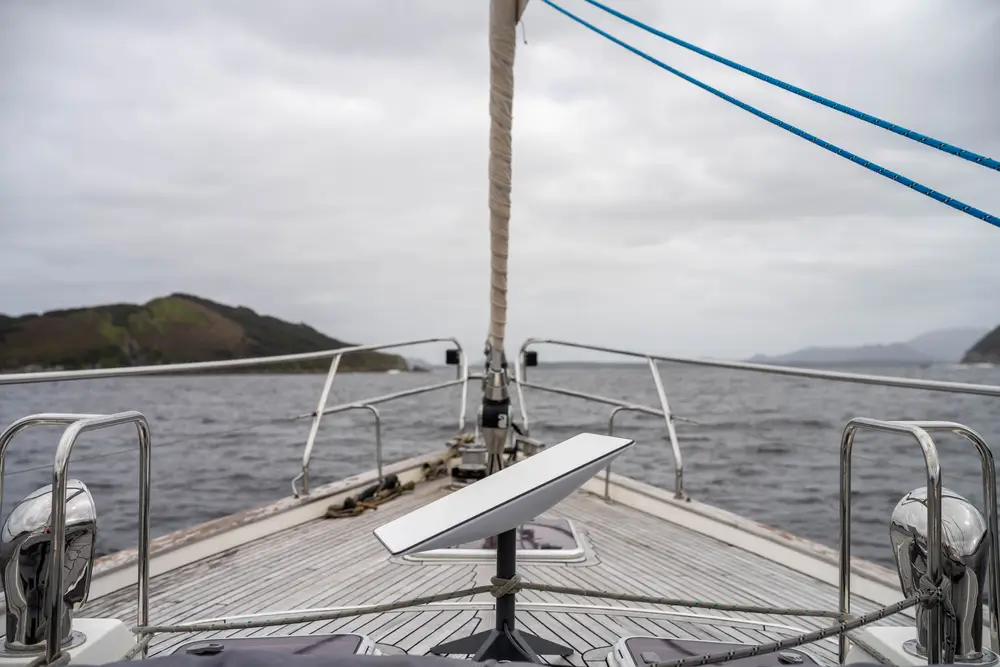
Starlink marine installation is not the same as setting a dish on a patio table at home. Boats move, flex, vibrate, take spray, and expose every connector to salt, sun, and constant moisture. A good marine install has to solve for clear sky view, safe cable routing, proper power, corrosion control, and a mount that will not loosen after a few rough crossings.
Starlink Maritime can be a strong option for boat owners who need usable internet away from the dock, including liveaboards, charter operators, commercial crews, and coastal cruisers. The hardware is capable, but performance depends heavily on where it is mounted and how cleanly the system is wired. We have seen excellent systems dragged down by a poor location, crushed cable, weak inverter, or unsealed deck penetration. This guide covers what matters before you drill holes, choose a mount, or rely on Starlink offshore.
Starlink Marine Installation: What Makes Boats Different
A boat installation has two jobs: keep the Starlink terminal connected to satellites and keep the system alive in a harsh marine environment. On land, we usually worry most about trees and roof access. On a vessel, we add mast shadows, radar arches, rigging, cabin tops, antennas, solar panels, and people walking around the deck.
The terminal needs the widest practical view of the sky. Temporary setups may work at the dock, but underway the boat’s heading, pitch, and roll can turn a marginal location into repeated dropouts. Sailboats have extra challenges from masts, booms, and stays. Powerboats often have better hardtop or arch locations, but radar, VHF antennas, and outriggers still need to be considered.
Marine installs also need better strain relief and weather protection than most home installs. Cable movement is a major issue. If a cable is allowed to flap, rub against fiberglass, or bend sharply at a deck gland, it will eventually fail. Saltwater also finds weak points quickly. The goal is not just to make Starlink work on day one, but to build an installation that still works after vibration, spray, heat, and repeated washdowns.
Choosing the Best Mounting Location
The best mounting location is high, stable, and as obstruction-free as possible. On many powerboats, that means a hardtop, radar arch, tower, or upper deck rail. On sailboats, common options include a stern rail, custom pole, aft arch, or dedicated mount placed where the boom and rigging create the least interference. The right choice depends on the boat’s layout and how it is used.
We look for four things before recommending a mount:
- Clear sky view: Avoid locations blocked by masts, radar arrays, solar panels, or cabin structures.
- Solid structure: The mounting surface must handle vibration and wind load without flexing excessively.
- Safe cable path: The route should avoid sharp turns, pinch points, hot equipment, and walking surfaces.
- Service access: The terminal and cable connections should be reachable for inspection or replacement.
Temporary rail mounts can be useful for testing, but permanent marine installations should use hardware suited for the vessel and conditions. Stainless fasteners, backing plates where needed, proper sealant, and clean cable support make a major difference. A low-effort mount may look fine at the slip and fail after the first rough run.
Cable Routing, Sealing, and Corrosion Protection
Cable work is where many marine Starlink problems start. The cable should be routed with smooth bends, secure support, and protection anywhere it passes through fiberglass, aluminum, bulkheads, lockers, or equipment spaces. Crushing or kinking the cable can cause intermittent service that is hard to diagnose later.
Deck penetrations need to be planned carefully. A proper marine cable gland or sealed pass-through is far better than forcing cable through an oversized hole and filling it with sealant. The hole should be located where water does not pool, where the cable has drip control, and where the inside path remains accessible. If the boat is cored fiberglass, the core should be protected from water intrusion.
Corrosion control matters. Salt air attacks cheap fasteners, exposed connectors, and poorly supported cable hardware. We prefer marine-grade stainless components, UV-rated cable management, and clean separation from chafe points. If the cable runs near battery compartments, engines, generators, or high-heat spaces, it needs extra protection or a different route. A neat install is not just cosmetic on a boat. It is usually a more reliable install because every bend, clamp, gland, and fastener has a job.
Power Requirements and Network Setup Onboard
Before installing Starlink Maritime, confirm how it will be powered. Some vessels use AC power from shore power, an inverter, or generator. Others may use DC conversion equipment depending on the hardware and system design. The important point is stable power. Weak inverters, overloaded circuits, and voltage drops can cause reboots, slow performance, or random disconnects that look like signal problems.
The router location also matters. Boats are full of signal-blocking materials, including metal, wiring, engines, appliances, and dense cabinetry. Placing the router deep inside a cabin can reduce Wi-Fi coverage on deck or in staterooms. Larger vessels may need additional networking equipment or access points to distribute service properly.
We also recommend thinking through how Starlink will interact with other onboard systems. If you have existing cellular, marina Wi-Fi, navigation equipment, cameras, or business systems, the network should be arranged in a way that is easy to use and troubleshoot. Charter boats and commercial vessels often need guest access separated from crew or operations devices. A professional install can clean up the power and network side so the system is not just connected, but practical for daily use.
Performance Expectations for Starlink Maritime
Starlink Maritime can deliver strong speeds and lower latency than many legacy marine internet options, but boat owners should still understand real-world limits. Performance changes with service plan, coverage area, network demand, obstructions, weather, and vessel movement. A clean installation gives the system its best chance, but it cannot remove every limitation of satellite internet.
The most common performance complaint we see is not the satellite network itself. It is obstruction. A mast, radar dome, spreader, hardtop edge, or nearby dock structure can create short outages that add up, especially during video calls or streaming. Underway, those obstructions change constantly as the vessel turns. This is why mount location matters so much.
Heavy rain can also affect service, especially in intense cells. For most boaters, brief weather-related slowdowns are manageable, but mission-critical operations should plan backup communications. Starlink should not replace required marine safety communications such as VHF, EPIRB, AIS, or satellite safety devices. Treat it as high-value internet connectivity, not your only emergency communications system.
When to Hire a Professional Marine Installer
Many boat owners are hands-on, and a simple temporary setup may be fine for weekend use at the dock. A professional Starlink marine installation makes more sense when the system needs to be permanent, reliable underway, neatly integrated, or installed on a vessel where water intrusion and wiring mistakes are expensive.
Hire an installer if the job involves drilling through the deck, routing cable through tight spaces, mounting on a hardtop or arch, integrating with existing network equipment, or solving Wi-Fi coverage across multiple cabins. Professional installers also know how to avoid common mistakes such as poor strain relief, unprotected core material, bad router placement, and mounting locations that look clear but are obstructed during real use.
InstallPros handles Starlink installations for homes, businesses, and marine customers. The right install saves time, protects the boat, and reduces the chance of chasing intermittent problems later. On a boat, clean work is not a luxury. It is part of making the system dependable.
Frequently Asked Questions
Can Starlink be installed permanently on a boat?
Yes, Starlink can be installed permanently on many boats when the mount, cable route, power source, and sealing method are chosen correctly. A permanent installation usually places the terminal on a hardtop, arch, pole, tower, or rail mount with marine-grade hardware. The cable should be protected from chafe, movement, and water intrusion. The biggest concern is not just getting service at the dock, but keeping the system reliable underway in vibration, spray, sun, and changing vessel angles.
Where is the best place to mount Starlink on a boat?
The best place is usually the highest stable location with the clearest view of the sky and the least interference from masts, radar domes, hardtops, solar panels, and antennas. On powerboats, that is often a hardtop or radar arch. On sailboats, it may be a stern rail, aft arch, or custom pole. The location also needs a safe cable path and service access. A spot that works at the dock may not perform well once the boat turns, rolls, or passes through chop.
Does Starlink Maritime work while underway?
Starlink Maritime is designed for use on vessels, including while underway when used with the appropriate service and hardware. Real-world performance depends on coverage, obstructions, weather, power stability, and how the terminal is mounted. A poor mounting location can create dropouts as the boat changes heading or pitch. For the best results, the terminal should have a wide sky view and be mounted securely enough to handle vibration, wind, and normal marine conditions.
Can I install Starlink on my boat myself?
Some boat owners can handle a basic temporary setup, especially if no drilling or complex wiring is required. A permanent marine installation is more demanding. Mistakes with deck penetrations, cable routing, sealant, power, or mounting hardware can lead to leaks, corrosion, damaged cable, or unreliable service. If you need a clean permanent install, router placement inside the boat, or integration with existing network equipment, hiring a professional installer is usually the safer choice.
Is Starlink a replacement for marine safety communications?
No. Starlink is an internet system and should not be treated as the only safety communications option on a vessel. Boat owners should still maintain required and appropriate marine safety equipment such as VHF radio, EPIRB, AIS, and other emergency systems based on the vessel and operating area. Starlink can be extremely useful for weather, messaging, business, streaming, and general connectivity, but satellite internet can be affected by coverage, obstructions, power issues, and severe weather.