Revolutionizing Home Automation: Starlink's Impact on Smart Learning Thermostats
April 29, 2024 · 2 min read
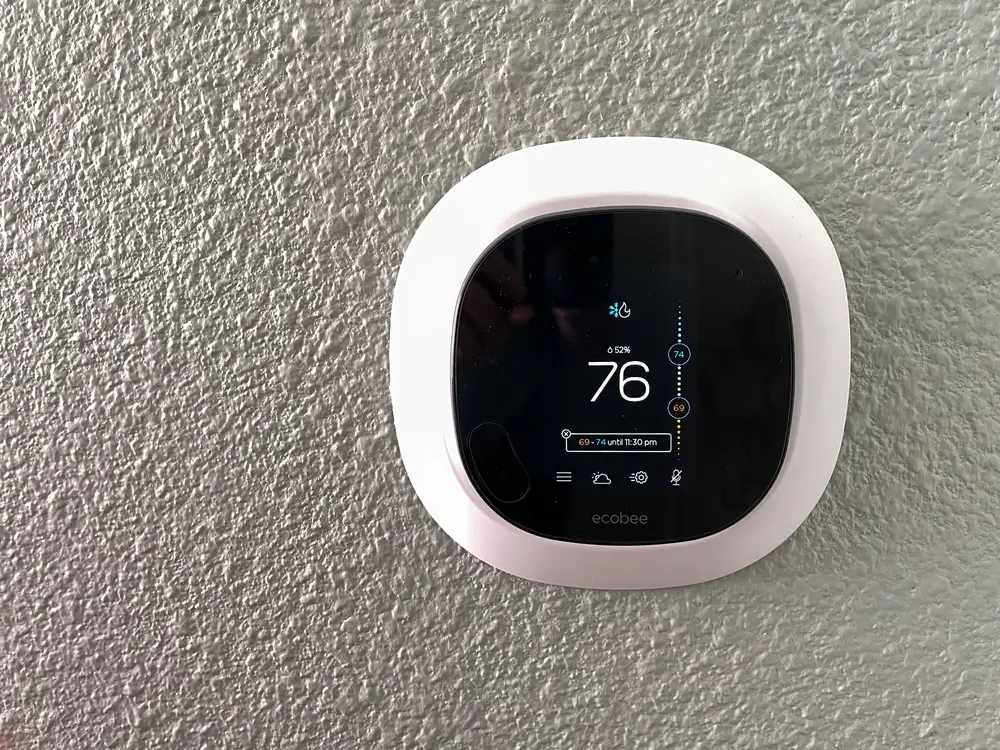
In the rapidly evolving landscape of home automation, connectivity is king. Imagine a world where your thermostat not only learns your preferences but also adjusts in real-time based on weather forecasts, utility signals, or occupancy patterns. That vision is closer to everyday reality thanks to Smart Learning Thermostats and transformative internet technologies such as Starlink, SpaceX's low Earth orbit (LEO) satellite internet constellation. Below is a comprehensive guide covering compatible thermostats, a step-by-step setup walkthrough, latency and performance considerations, security best practices, and why InstallPros.io is the partner to call for integrated Starlink + smart thermostat installs.
Starlink: A Game-Changer for Connectivity
Starlink has rapidly changed expectations for satellite internet by deploying thousands of LEO satellites to deliver higher bandwidth and much lower latency than traditional geostationary satellite systems. Typical real-world Starlink download speeds range from 50–250 Mbps with latency commonly between 20–60 ms depending on geography, hardware generation, and network load. For smart home devices, that translates to reliable cloud connectivity, faster firmware updates, and near-instant remote control—even in rural, coastal, or off-grid locations where wired broadband is unavailable or unreliable.
Key technical advantages Starlink brings to smart thermostats and whole-home automation:
- Consistent uplink/downlink: Enables timely telemetry, rule execution, and OTA updates.
- Low latency: Improves responsiveness for remote commands and integrations with voice assistants or energy demand response signals.
- Wide coverage: Brings advanced automation to remote cabins, farms, and temporary sites (construction trailers, seasonal rentals).
- High throughput: Facilitates simultaneous device connections across large smart home installations or enterprise sites.
How Starlink Enhances Smart Learning Thermostats
Smart Learning Thermostats—the category popularized by products like the Nest Learning Thermostat—rely on cloud services and APIs to perform functions such as pattern learning, predictive scheduling, weather-adaptive control, and integration with third-party services (utility programs, voice assistants, home automation platforms). Starlink improves these capabilities by ensuring the thermostat is almost always online and able to sync with cloud AI models and third-party triggers.
- Reliable cloud sync: Learning models and remote adjustments stay up-to-date, improving comfort and efficiency.
- Faster firmware and security updates: Reduces window of vulnerability and enables new features to roll out smoothly.
- Better integration: Coordinate HVAC behavior with smart lighting, blinds, security systems, and utility demand management.
- Accessibility for remote homes: Residents in underserved areas gain the same functionality as urban users.
Compatible Thermostat Brands and Ecosystems
Most modern smart thermostats are compatible with Starlink as long as the thermostat can connect to a local IP network (via Wi‑Fi or hub). Popular brands and models include:
- Google Nest: Nest Learning Thermostat, Nest Thermostat (newer models) — deep learning features, Google Home integration.
- Ecobee: Ecobee SmartThermostat with voice control — supports remote sensors, HomeKit, Alexa, and integrations with energy programs.
- Honeywell Home / Resideo: T9, T10 Pro — widely used in residential and commercial settings with advanced scheduling.
- Emerson Sensi: Sensi Touch and Wi‑Fi thermostats — budget-friendly with broad HVAC compatibility.
- Lux and Bosch: Offer several smart models compatible with cloud services and enterprise integrations.
- Johnson Controls / Carrier / Trane: Commercial-grade and connected thermostats for larger buildings and BMS integrations.
Compatibility notes: Always verify the thermostat supports your HVAC type (single-stage, multi-stage, heat pump, millivolt, or hydronic systems) and that you have the required wiring (C‑wire for continuous power is common). If your system lacks a C‑wire, many thermostats offer a power adapter or there are installation workarounds, but a professional assessment is recommended.
Step-by-Step Starlink + Smart Thermostat Setup Walkthrough
The following walkthrough assumes you have a working Starlink kit and a smart thermostat you want to connect. This covers the common residential scenario; enterprise or fleet setups may require additional network architecture and security measures.
Pre-install checklist
- Verify HVAC compatibility: Confirm thermostat supports your system and you have necessary wiring (C‑wire recommended).
- Starlink hardware installed: Dish mounted with clear sky view, powered, and online.
- Network plan: Decide whether to use the Starlink router or a third-party router (bridge mode available on newer Starlink units).
- Account access: Logins for both Starlink and the thermostat manufacturer’s cloud app.
- Backup power: Consider UPS for Starlink/router if you want remote access during short outages.
Physical and network setup
- Power down your HVAC system at the breaker for safety.
- Remove the old thermostat and label wires using the included stickers or take photos.
- Install the new thermostat base and connect wires; verify C‑wire connection. If needed, install the C‑wire adapter or use an HVAC pro to run a C‑wire.
- Restore HVAC power and finish thermostat physical installation.
- On your router: create a dedicated SSID for IoT devices or configure VLANs if using an advanced router. This helps isolate the thermostat for security.
- Connect the thermostat to your Wi‑Fi network (enter SSID and password) or pair with the hub as instructed by the manufacturer.
Cloud pairing and testing
- Create or log in to the thermostat vendor account and complete device registration.
- Allow the thermostat to download firmware updates—do not interrupt power or network during this step.
- Test basic commands locally and remotely: set temperature, change mode, check status in app.
- Enable optional integrations: Google Home, Alexa, Apple HomeKit, third-party energy programs, or building management systems.
- Set up geofencing, schedules, and energy-saving features. Monitor for 48–72 hours to ensure learning behavior and accuracy.
Professional tip: For enterprise or multi-site deployments, use an Ethernet-connected network gateway where possible and centralize management via a headless BMS or cloud portal for consistent firmware control and logging.
Latency and Performance Requirements
While Starlink’s LEO architecture provides low latency compared with traditional satellite internet, understanding latency and jitter is important when evaluating performance for smart thermostat use cases.
- Typical Starlink latency: 20–60 ms in most locations. This is more than adequate for thermostat control, command acknowledgement, and cloud sync.
- What thermostats require: Most smart thermostats operate fine with latencies up to several hundred milliseconds because many actions are asynchronous. Immediate remote temperature changes should appear within a few seconds under normal conditions.
- Firmware updates and OTA: Require sustained bandwidth; Starlink easily supports the tens of megabytes these updates typically entail.
- Demand response and utility signals: Some programs expect near-real-time acknowledgements; Starlink’s latency usually meets those requirements, but ensure a stable connection and low packet loss.
- Jitter and packet loss: Can affect responsiveness. For mission-critical or enterprise installations, implement redundancy (secondary connectivity or failover) and QoS rules to prioritize HVAC traffic on the network.
In short: for residential and most commercial thermostat applications, Starlink provides more than adequate latency and throughput. Where sub-second determinism is required (rare for thermostats), local control logic and fallback schedules should be employed.
Security and Best Practices
Smart thermostats connect to cloud services and therefore introduce potential attack surfaces. Follow these best practices when connecting devices over Starlink:
- Network segmentation: Put all IoT devices on a separate VLAN or guest network to limit access to your primary devices and data.
- Strong credentials: Use unique, complex passwords and enable two-factor authentication where available for thermostat accounts.
- Firmware updates: Keep thermostat and router firmware current to patch vulnerabilities.
- Disable unused services: Turn off remote access features you do not use, and limit third-party integrations to trusted services.
- Monitor logs: For enterprise deployments, centralize logs and alerts to detect anomalous behavior.
Use Cases: Where Starlink + Smart Thermostat Shines
Starlink paired with intelligent thermostats unlocks several high-value scenarios:
- Remote cabins and vacation rentals: Owners can pre-heat or cool before arrival and manage energy use remotely.
- Rural homes and farms: Reliable energy management where DSL or cable isn't available.
- Construction sites and temporary facilities: Remote monitoring of HVAC in trailers, temporary offices, or modular builds.
- Multi-site enterprises: Centralized control of many remote retail stores or facilities via Starlink connections with consistent performance.
Why Choose InstallPros?
InstallPros.io is the #1 Starlink installer in the USA, specializing in integrated connectivity and smart home installations. Whether you need a single residential setup or a complex enterprise rollout, InstallPros delivers turnkey services with same-week scheduling:
- Residential installs: Dish placement, router configuration, thermostat wiring (including C‑wire solutions), and user training for homeowners.
- Enterprise deployments: Centralized provisioning, VLAN and security design, and integration with building management systems.
- Fleet and multi-site: Scalable rollouts for retail chains, vacation rental portfolios, and remote office networks.
- Remote site installations: Off-grid cabins, farms, and construction sites—complete with power planning and weather-resistant mounting.
Our technicians are certified, insured, and experienced in both Starlink hardware and smart HVAC systems. InstallPros handles permits, site assessments, professional wiring, and full system validation so your smart learning thermostat performs reliably from day one. Schedule a consultation at InstallPros.io for same‑week availability and a professional installation plan tailored to your property.
Frequently Asked Questions
Will Starlink work with my existing smart thermostat?
Yes. Starlink provides a standard IP-based internet connection that most smart thermostats use to communicate with their cloud servers. As long as your thermostat can connect to Wi‑Fi or Ethernet and your HVAC wiring is compatible, Starlink will support remote control, firmware updates, and integrations. Verify vendor compatibility with your HVAC system and confirm the presence of a C‑wire if required.
How does latency affect smart thermostat performance?
Latency on Starlink is typically low enough (20–60 ms) that remote commands and cloud syncs are nearly instantaneous for thermostat use. Most thermostat functions are tolerant of higher latency because they operate asynchronously. Only in very specialized installations where sub-second responses are mandatory should you consider additional local control logic or redundant connectivity.
Can InstallPros install both the Starlink system and the thermostat?
Yes. InstallPros provides combined installations—mounting and aligning Starlink dishes, configuring network equipment, and professionally wiring and setting up your smart thermostat. We offer assessments to determine best placement, C‑wire needs, network segmentation, and verify system operation end-to-end.
What happens if my Starlink connection goes down—will my thermostat stop working?
Most smart thermostats have local control capabilities and will continue to follow schedules and maintain basic functionality if internet is lost. However, remote access, cloud‑based learning updates, and some integrations will be unavailable until connectivity is restored. For critical sites, InstallPros can design failover solutions or local control redundancies.
Do I need a special router or settings for Starlink?
Not necessarily. Many users can use the Starlink router or set Starlink in bypass/bridge mode and run a third-party router for advanced features (VLANs, QoS, enterprise-grade security). For larger or enterprise installations, we recommend a managed router and segmentation to isolate IoT devices and ensure consistent performance.
If you’re ready to upgrade your home or property with reliable Starlink connectivity and a professional smart thermostat install, visit InstallPros.io to schedule a same-week consultation and get an installation plan tailored to your needs.