Starlink and Home Automation: Enhancing Connectivity with Echo Show 8 Spatial Audio
May 1, 2024 · 3 min read
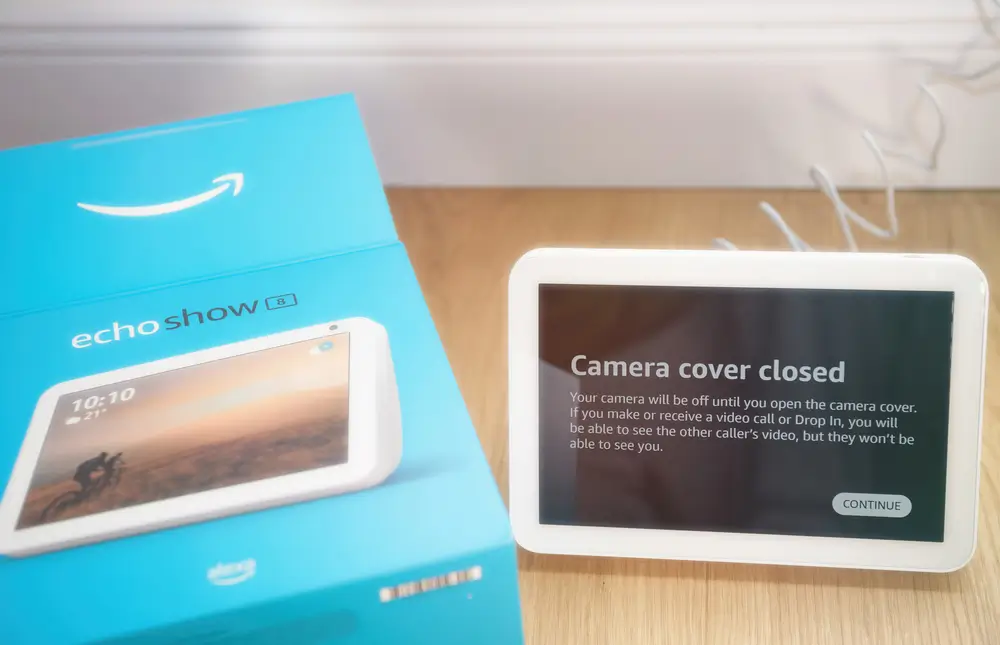
Starlink and Home Automation: Enhancing Connectivity with Echo Show 8 Spatial Audio
In the evolving smart home landscape, reliable internet is the backbone that enables voice assistants, video calling, streaming, and automation to work seamlessly. Starlink has emerged as a compelling option for homeowners, remote residences, and commercial sites that need high-throughput internet where traditional cable or fiber is unavailable. Combined with the Amazon Echo Show 8 with Spatial Audio, Starlink can elevate the smart home experience—improving streaming quality, reducing buffering during video calls, and supporting more robust automation routines. This guide provides an in-depth product review, Starlink bandwidth and latency considerations, a step-by-step setup guide, compatibility notes, and professional installation recommendations from InstallPros.io.
Echo Show 8 with Spatial Audio — Full Product Review
Key Specifications
- Display: 8" HD touchscreen (1280 x 800)
- Camera: 13 MP with auto-framing and privacy shutter
- Audio: Spatial audio with stereo speakers and adaptive tuning
- Smart Home Protocols: Built‑in Zigbee, Matter, and Thread support
- Connectivity: Dual-band Wi‑Fi, Bluetooth
- Privacy: Microphone/camera off button, physical camera shutter
- Materials: 29% recycled materials, 99% recyclable packaging
What We Like
- Balanced audio and display: Spatial audio creates a fuller soundstage for music, video, and voice, making it a strong living-room or kitchen device.
- Excellent video calling: The 13 MP camera with auto-framing keeps participants centered and offers clear visuals even in less-than-ideal lighting.
- Smart home hub capabilities: Native Zigbee and Matter support reduces the need for extra hubs—simplifying multi-vendor device setups.
- Privacy controls: Physical shutter and mute button provide straightforward privacy management.
Limitations
- Not 4K: The 8" HD display is excellent for its form factor but not suitable for 4K content.
- Dependent on network: For the best spatial audio streaming and video calls, a stable, low-latency internet connection is required.
- Advanced networking: While Echo Show 8 supports local smart-home protocols, more complex enterprise integrations may require additional hardware or professional configuration.
How Starlink Improves Echo Show 8 Performance
Uninterrupted Streaming and Low Buffering
Starlink’s satellite internet provides download speeds that typically range from 50 Mbps to 250+ Mbps depending on the plan and terminal generation. For a device like the Echo Show 8, this bandwidth is more than adequate to stream HD video, music services, and handle simultaneous smart home traffic across multiple devices. The higher throughput reduces buffering, enabling Spatial Audio to render as intended when streaming lossless or high-bitrate audio.
Latency and Real-Time Features
Latency is the key metric for real-time features like video calls and voice responsiveness. Typical Starlink latency ranges from 20–50 ms for residential terminals and can be lower for business-class services. That latency range is comparable to many terrestrial ISPs and is generally sufficient for crisp video calls and responsive Alexa interactions.
Network Capacity for Smart Home Routines
Smart home automation often involves many devices communicating simultaneously—cameras, locks, thermostats, lighting, and entertainment devices. Starlink’s bandwidth and regional capacity make it capable of supporting moderate-to-heavy smart home workloads, especially when paired with a robust internal network (mesh Wi‑Fi, VLAN segmentation, and QoS).
Starlink Bandwidth & Latency Requirements — What to Know
Bandwidth Estimates per Use Case
- Alexa voice commands: Minimal (<<1 Mbps)
- Standard video calling (720p/HD): 1.5–3 Mbps per stream
- HD streaming (Amazon Prime, Netflix): 3–8 Mbps
- High-bitrate music streaming: 0.5–1.5 Mbps per stream
- Multiple smart devices & cameras: 5–50 Mbps aggregate (depending on number of cameras/quality)
Latency Considerations
- Video calls & responsiveness: Aim for under 60 ms for high-quality calls.
- Home automation triggers: Most triggers tolerate up to ~200 ms, but for synchronized multi-device scenes, lower latency is preferable.
- Gaming & real-time enterprise apps: If you require sub-30 ms latency for competitive gaming or low-latency enterprise applications, consider Starlink Business or consult InstallPros for hybrid network options (fiber + Starlink failover).
Compatibility Notes & Networking Caveats
Starlink IP & NAT Behavior
Residential Starlink commonly uses carrier-grade NAT (CGNAT) which can limit direct inbound connections. If you need static public IPv4 addresses, port forwarding, or remote access to local servers (e.g., for certain smart home hubs), the Business plan or Starlink Business static IP options may be necessary. InstallPros can help assess whether your setup requires a static IP or VPN for reliable remote access.
Third-Party Router Integration
Starlink includes a basic router with residential kits. For advanced home networks—mesh Wi‑Fi, VLANs, QoS, enterprise-level security—using a third-party router is recommended. Echo Show 8 will function on standard Wi‑Fi networks, but to maximize performance and priority, configure QoS to prioritize Alexa/Echo traffic and video streams.
Ethernet & Wired Options
Some Echo Show models support Ethernet via adapters; connecting critical smart-home controllers or local bridges (Home Assistant, SmartThings hub, etc.) to a wired network provides improved reliability. Starlink terminals that support Ethernet or use a router-to-ethernet adapter are better for stable backhaul to multi-access points and wired devices.
Step-by-Step Setup Guide: Starlink + Echo Show 8 Integration
Pre-Installation Checklist
- Confirm Starlink kit model and any required mounting hardware
- Choose Echo Show 8 placement with strong Wi‑Fi coverage
- Decide whether to use Starlink’s router or a third‑party router
- Plan for power protection (surge protector and optional UPS for uptime)
Starlink Hardware Setup
- Unpack and assemble the Starlink dish: Follow the included quick-start guide. Mount on a tripod, pole, or roof location with a clear view of the sky (no obstructions within the dish’s field of view).
- Mounting considerations: Roof mounts and pole mounts provide long-term stability; for temporary installs, use the included tripod. Ensure ground mounting is secure and code-compliant.
- Run the cable: Route the supplied cable to the indoor power supply / router. Use grommets and weatherproofing for roof penetrations. Consider conduit for long runs.
- Connect and power on: Plug into the Starlink router/power module and power it up. Use the Starlink app to complete initial activation.
Network Optimization
- If using a third‑party router, set Starlink to bypass mode (if supported) or place your router downstream. Configure the router for DHCP, QoS, and firewall policies.
- Set up a Wi‑Fi SSID dedicated to smart home devices to isolate traffic and improve security.
- Enable Quality of Service to prioritize video and voice traffic from the Echo Show 8.
- If you require port forwarding or remote access, evaluate Starlink Business or implement a VPN solution.
Echo Show 8 Setup & Smart Home Integration
- Initial setup: Power on the Echo Show 8 and follow the on-screen prompts to connect to your Starlink Wi‑Fi SSID.
- Enable Alexa skills: Link music, video, and communication services in the Alexa app (Amazon Music, Spotify, Zoom/Skype if supported).
- Device discovery: Use the Alexa app to discover local Zigbee, Thread, or Matter devices. For Matter setup, ensure devices are updated and on the same IP range.
- Create routines: Build automation routines in the Alexa app (e.g., “Good Morning” routine that adjusts lighting, thermostats, and starts a news briefing on the Echo Show 8).
- Test video calling and Spatial Audio: Place a test call and play high-quality audio to verify the Starlink connection delivers low-latency, buffered-free media.
Best Practices & Professional Tips
- Surge protection and grounding: Protect Starlink equipment with surge protectors and ensure outdoor mounts are properly grounded per local electrical code.
- UPS for power-sensitive areas: Use an uninterruptible power supply to keep the router and Echo Show online during short power outages.
- Segmentation: Isolate IoT devices on a separate VLAN for security and performance.
- Firmware updates: Keep Starlink firmware and Echo Show firmware up to date for best performance and security.
Why Choose InstallPros?
InstallPros.io is the #1 Starlink installer in the USA, delivering professional installation and network optimization services for residential, enterprise, fleet, and remote-site deployments. Our services include same-week scheduling, on-site assessments, and turnkey installations that cover everything from rooftop roof-mounts and pole installations to enterprise-grade routing, VLAN configuration, and mesh Wi‑Fi deployment. Whether you need a single home Starlink + Echo Show 8 integration or a fleet of Starlink units deployed to remote assets, InstallPros has the certified technicians, licensing, and insurance to complete the job safely and efficiently.
Services we provide:
- Residential Starlink installations with optimal dish placement and Wifi mesh
- Enterprise and multi-site Starlink deployments with advanced networking (VLAN, QoS, VPN)
- Fleet and mobile Starlink installations for vehicles, vessels, and remote equipment
- Remote site installations with solar/UPS power options and hardened mounts
- Same-week scheduling and post-install support to ensure your Echo Show and entire smart home performs at peak levels
Contact InstallPros.io for a free consultation and site assessment to get your Starlink and Echo Show 8 system installed and optimized by professionals.
FAQ
Will Starlink support multiple Echo devices and other smart devices in my home?
Yes. Starlink’s bandwidth—typically 50–250+ Mbps—can support multiple Echo devices, cameras, thermostats, and streaming devices. Network design matters: for larger homes or many simultaneous streams, InstallPros recommends a mesh Wi‑Fi system, VLAN separation for IoT devices, and QoS configuration to ensure reliable performance.
Do I need Starlink Business to use Echo Show 8 effectively?
Not in most residential cases. Residential Starlink typically provides sufficient speeds and latency for Echo Show 8 streaming and video calls. You should consider Starlink Business if you need a static public IP, guaranteed higher throughput, lower contention, or enterprise-level SLAs.
Can the Echo Show 8 act as a Zigbee or Matter hub with Starlink?
Yes. The Echo Show 8 includes built-in Zigbee and Matter support, allowing it to act as a local coordinator for compatible devices. Starlink is the internet backhaul and does not replace local hub functionality. Ensure devices are on the same local network and follow Matter commissioning steps for the smoothest integration.
How do I get the best audio quality from Spatial Audio over Starlink?
Spatial audio depends on both the Echo Show 8’s hardware and the quality of streamed audio. To maximize results, use high-bitrate audio services where possible, configure QoS to prioritize audio/video traffic, and ensure a stable local Wi‑Fi connection—preferably with the Echo Show placed within strong signal range of your primary access point.
Can InstallPros handle installations for remote sites or fleets?
Absolutely. InstallPros specializes in remote-site deployments and fleet installations, including mounting, grounding, long cable runs, solar/UPS integration, and ruggedized hardware where necessary. We provide project management, site surveys, and ongoing maintenance packages to keep your network and smart devices online.
Conclusion
Combining Starlink’s satellite internet with the Amazon Echo Show 8 with Spatial Audio creates a powerful, flexible smart-home ecosystem—especially in locations without reliable terrestrial internet. Proper planning, network optimization, and professional installation can transform the user experience: clearer video calls, uninterrupted streaming, and responsive automation routines. For homeowners and businesses that want a turnkey solution, InstallPros.io offers expert Starlink installations, advanced networking, and same-week scheduling to get your smart home systems up and running quickly and reliably.